A/ Install OS from OVH UBUNTU 16.04 TEMPLATE
A.1/ /dev/sda
/boot: 500MB
/: 20GB
swap: default
/var: lv01: 20GB
/opt: lv02: remain
A.2/ dev/sdb
+DELETE OLD DATA
+FORMAT EXT4
+Add to LVM, lv02
B/ CONFIG SERVER WITH THESE INFO
watch -n 5 "COLUMN= lsblk -o NAME,FSTYPE,SIZE,MOUNTPOINT,LABEL;pvs;vgs;lvs;df -h;date;"
#Change LVM INFO:
nano /etc/lvm/lvm.conf
#QWERTY: ORIGIN:
# locking_type = 1
locking_type = 0
#Disable iptables:
service netfilter-persistent flush
#
lsblk -o NAME,FSTYPE,SIZE,MOUNTPOINT,LABEL
#1/
fdisk /dev/sdb
#2/
mkfs.ext4 /dev/sdb1
#3/
root@ns563707 /# pvcreate /dev/sdb1
WARNING: ext4 signature detected on /dev/sdb1 at offset 1080. Wipe it? [y/n]: y
Wiping ext4 signature on /dev/sdb1.
Physical volume "/dev/sdb1" successfully created
#4/
root@ns563695 /# vgextend vg /dev/sdb1
Volume group "vg" successfully extended
#5/
lvscan
#6/
lvresize -l +100%FREE --resizefs /dev/vg/lv02
2019-01-17

2019-01-02
A Guide to Common Types of Two-Factor Authentication on the Web
Two-factor authentication (or 2FA) is one of the biggest-bang-for-your-buck ways to improve the security of your online accounts. Luckily, it's becoming much more common across the web. With often just a few clicks in a given account's settings, 2FA adds an extra layer of security to your online accounts on top of your password.
In addition to requesting something you know to log in (in this case, your password), an account protected with 2FA will also request information from something you have (usually your phone or a special USB security key). Once you put in your password, you'll grab a code from a text or app on your phone or plug in your security key before you are allowed to log in. Some platforms call 2FA different things—Multi-Factor Authentication (MFA), Two Step Verification (2SV), or Login Approvals—but no matter the name, the idea is the same: Even if someone gets your password, they won't be able to access your accounts unless they also have your phone or security key.
There are four main types of 2FA in common use by consumer websites, and it's useful to know the differences. Some sites offer only one option; other sites offer a few different options. We recommend checking twofactorauth.org to find out which sites support 2FA and how, and turning on 2FA for as many of your online accounts as possible. For more visual learners, this infographic from Access Now offers additional information.
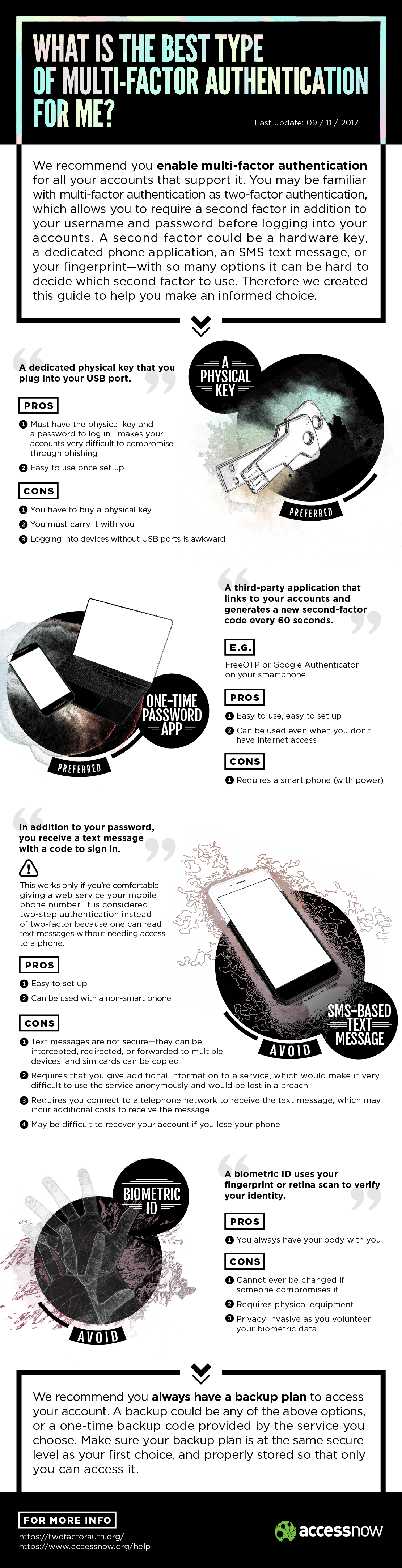
Finally, the extra layer of protection from 2FA doesn't mean you should use a weak password. Always make unique, strong passwords for each of your accounts, and then put 2FA on top of those for even better log-in security.
SMS 2FA
When you enable a site's SMS 2FA option, you'll often be asked to provide a phone number. Next time you log in with your username and password, you'll also be asked to enter a short code (typically 5-6 digits) that gets texted to your phone. This is a very popular option for sites to implement, since many people have an SMS-capable phone number and it doesn't require installing an app. It provides a significant step up in account security relative to just a username and password.
There are some disadvantages, however. Some people may not be comfortable giving their phone number—a piece of potentially identifying information—to a given website or platform. Even worse, some websites, once they have your phone number for 2FA purposes, will use it for other purposes, like targeted advertising, conversion tracking, and password resets. Allowing password resets based on a phone number provided for 2FA is an especially egregious problem, because it means attackers using phone number takeovers could get access to your account without even knowing your password.
Further, you can't log in with SMS 2FA if your phone is dead or can't connect to a mobile network. This can especially be a problem when travelling abroad. Also, it's often possible for an attacker to trick your phone company into assigning your phone number to a different SIM card, allowing them to receive your 2FA codes. Flaws in the SS7 telephony protocol can allow the same thing. Note that both of these attacks only reduce the security of your account to the security of your password.
Authenticator App / TOTP 2FA
Another phone-based option for 2FA is to use an application that generates codes locally based on a secret key. Google Authenticator is a very popular application for this; FreeOTP is a free software alternative. The underlying technology for this style of 2FA is called Time-Based One Time Password (TOTP), and is part of the Open Authentication (OATH) architecture (not to be confused with OAuth, the technology behind "Log in with Facebook" and "Log in with Twitter" buttons).
If a site offers this style of 2FA, it will show you a QR code containing the secret key. You can scan that QR code into your application. If you have multiple phones you can scan it multiple times; you can also save the image to a safe place or print it out if you need a backup. Once you've scanned such a QR code, your application will produce a new 6-digit code every 30 seconds. Similar to SMS 2FA, you'll have to enter one of these codes in addition to your username and password in order to log in.
This style of 2FA improves on SMS 2FA because you can use it even when your phone is not connected to a mobile network, and because the secret key is stored physically on your phone. If someone redirects your phone number to their own phone, they still won't be able to get your 2FA codes. It also has some disadvantages: If your phone dies or gets stolen, and you don't have printed backup codes or a saved copy of the original QR code, you can lose access to your account. For this reason, many sites will encourage you to enable SMS 2FA as a backup. Also, if you log in frequently on different computers, it can be inconvenient to unlock your phone, open an app, and type in the code each time.
Push-based 2FA
Some systems, like Duo Push and Apple's Trusted Devices method, can send a prompt to one of your devices during login. This prompt will indicate that someone (possibly you) is trying to log in, and an estimated location for the login attempt. You can then approve or deny the attempt.
This style of 2FA improves on authenticator apps in two ways: Acknowledging the prompt is slightly more convenient than typing in a code, and it is somewhat more resistant to phishing. With SMS and authenticator apps, a phishing site can simply ask for your code in addition to your password, and pass that code along to the legitimate site when logging in as you. Because push-based 2FA generally displays an estimated location based on the IP address from which a login was originated, and most phishing attacks don't happen to be operated from the same IP address ranges as their victims, you may be able to spot a phishing attack in progress by noticing that the estimated location differs from your actual location. However, this requires that you pay close attention to a subtle security indicator. And since location is only estimated, it's tempting to ignore any anomalies. So the additional phishing protection provided by push-based 2FA is limited.
Disadvantages of push-based 2FA: It's not standardized, so you can't choose from a variety of authenticator apps, and can't consolidate all your push-based credentials in a single app. Also, it requires a working data connection on your phone, while Authenticator apps don't require any connection, and SMS can work on an SMS-only phone plane (or in poor signal areas).
FIDO U2F / Security Keys
Universal Second Factor (U2F) is a relatively new style of 2FA, typically using small USB, NFC or Bluetooth Low Energy (BTLE) devices often called "security keys." To set it up on a site, you register your U2F device. On subsequent logins, the site will prompt you to connect your device and tap it to allow the login.
Like push-based 2FA, this means you don't have to type any codes. Under the hood, the U2F device recognizes the site you are on and responds with a code (a signed challenge) that is specific to that site. This means that U2F has a very important advantage over the other 2FA methods: It is actually phishing-proof, because the browser includes the site name when talking to the U2F device, and the U2F device won't respond to sites it hasn't been registered to. U2F is also well-designed from a privacy perspective: You can use the same U2F device on multiple sites, but you have a different identity with each site, so they can't use a single unique device identity for tracking.
The main downsides of U2F are browser support, mobile support, and cost. Right now only Chrome supports U2F, though Firefox is working on an implementation. The W3C is working on further standardizing the U2F protocol for the web, which should lead to further adoption. Additionally, mobile support is challenging, because most U2F devices use USB.
There are a handful of U2F devices that work with mobile phones over NFC and BTLE. NFC is supported only on Android. On iOS, Apple does not currently allow apps to interact with the NFC hardware, which prevents effective use of NFC U2F. BTLE is much less desirable because a BTLE U2F device requires a battery, and the pairing experience is less intuitive that tapping an NFC device. However, poor mobile support doesn't mean that using U2F prevents you from logging in on mobile. Most sites that support U2F also support TOTP and backup codes. You can log in once on your mobile device using one of those options, while using your phishing-proof U2F device for logins on the desktop. This is particularly effective for mobile sites and apps that only require you to log in once, and keep you logged in.
Lastly, most other 2FA methods are free, assuming you already have a smartphone. Most U2F devices cost money. Brad Hill has put together a review of various U2F devices, which generally cost USD $10-$20. GitHub has written a free, software-based U2F authenticator for macOS, but using this as your only U2F device would mean that losing your laptop could result in losing access to your account.
Bonus: Backup Codes
Sites will often give you a set of ten backup codes to print out and use in case your phone is dead or you lose your security key. Hard-copy backup codes are also useful when traveling, or in other situations where your phone may not have signal or reliable charging. No matter which 2FA method you decide is right for you, it's a good idea to keep these backup codes in a safe place to make sure you don't get locked out of your account when you need them.
Source: https://www.eff.org/deeplinks/2017/09/guide-common-types-two-factor-authentication-web?fbclid=IwAR1MuTpnQAxw-FOg_Id8wA_CmgRvn3_LjmSBaAJtsFf8WsDXa_mG6r12BSw
2018-12-19
How To Add and Use Taggged and Untagged VLANs Trunks on pfSense Router Interfaces
How To Add and Use Taggged and Untagged VLANs Trunks on pfSense Router Interfaces(Complatible and tested with Cisco switches) |
Updated May 13, 2018: Configuration can be done completely within the pfSense GUIObjective: Using VLANs and Trunking to provide subnet 192.168.10.0 tagged on interfaces em3 & em4 to trunked interfaces on switches. Requirements: Available Interfaces em2 (OPT1), em3 (OPT2), em4 (OPT3) 3 subnets each on it's own router interface to its own switch 192.168.10.0 on em2 (VLAN10) 192.168.20.0 on em3 (VLAN20) 192.168.30.0 on em4 (VLAN30) Note: 192.168.10.0 on em2 will be untagged 192.168.10.0 on em3 will be tagged 192.168.10.0 on em4 will be tagged 192.168.20.0 on em3 will be untagged 192.168.30.0 on em4 will be untagged This was developed on pfSense 2.4.3-RELEASE (amd64) built on Mon Mar 26 18:02:04 CDT 2018 FreeBSD 11.1-RELEASE-p7 (Click on screenshots to zoom, back buttion to return) Source: http://www.curtronics.com/Networking/pfSense/pfSenseTrunkedVLANs.html |
2018-12-14
[Jira] Server vs. Data Center – What’s right for you?
Many teams choose Atlassian Server products because they want or need control over their data and infrastructure. But did you know that Atlassian offers another option for you to deploy on your own infrastructure?
This alternative is called Atlassian Data Center, our self-managed enterprise offering, which provides the same functionality you know and love in our Server products, but has additional capabilities to better serve enterprise organizations. A Data Center edition is available for Jira Software, Confluence, Bitbucket, Jira Service Desk, and Crowd.
But really, what’s the difference between Server and Data Center?

Let’s start with the basics. Both deployment options provide you with control over your data and infrastructure. The main distinction is that while Server runs on a single nodewith internalized data stores, Data Center allows you to run on multiple nodes with externalized data stores.
When your Server instances grow, and your organization’s ability to build products and deliver services puts an increasingly demanding load on them, you might need a better way to stay ahead. For many of you, not only is the rate of your organization’s growth too much for a single server to handle, but as your organization continues to mature, you need a better solution to meet the growing list of requirements your software needs to meet company requirements.
We built Data Center with this group of our customers in mind. Atlassian Data Center was built to serve our Server customers as they grow and mature by providing them the infrastructure and capabilities to ensure consistent performance as they scale. Atlassian Data Center also helps teams work faster and smarter as they grow and gain increased control over the application. In addition, this better meets evolving security and compliance needs.
When should you consider upgrading to Data Center?
To determine whether Server or Data Center is the right fit for you, we’ve outlined some criteria to help in the decision-making process:

Users
How many users do you have accessing your Atlassian applications each day? Is this number growing? We’ve found that Jira Software, Confluence, and Bitbucket customers typically need more stability between 500 – 1,000 users. 45% of current Data Center customers have upgraded to this offering at the 500 or 1,000 user tier. For Jira Service Desk, we found that 50% of Data Center customers upgrade when they reach 50 agents. Your team’s growth rate is also a good indication of which option you should choose.

Performance
As you scale, do you still get the same level of performance? Performance degradation usually happens under high load or peak times for larger customers. Many global companies experience this when their teams in multiple geographic locations are online at the same time. In addition to concurrent usage, other running jobs like API calls and queries can also impact performance. Therefore, it’s also important for you to evaluate your number of concurrent users and the impact that your global offices are having on overall system performance.

Downtime
Is downtime unacceptable in your organization? Do you know what an hour of downtime costs you? There are typically two primary causes of downtime: application and server-side.
Application issues are often caused by JVM errors. Most commonly, application failure is caused when memory dedicated on the server for running the application gets too full or when the database’s connection is overloaded by requests.
Server disruption or crashes can be caused by a variety of things including planned maintenance, unplanned upgrades or installations, or resources such as CPU, RAM, or storage on the server being overwhelmed. Any type of outage results in lost productivity from your employees being unable to work. It is important to consider how many of your employees rely on Atlassian products to get their jobs done and what that hour of downtime may cost you.

Administration
How are you trying to streamline your administrative processes? Some of you may be using a federated environment or trying to meet your needs on a single server. However, your job quickly becomes more complicated when your single server is overloaded or your federated servers aren’t working together the way you’d like. Are you spending too much time managing simple tasks like password reset requests? Our Data Center offerings aim to simplify your job by giving you the tools you need to maintain optimal performance, avoid downtime, and manage your continued growth.
Learn more about Data Center
As you can see, there are many factors that make Data Center a great option for Server customers as their needs grow and change over time. And we are invested in continuing to build new Data Center capabilities to meet these needs. You can learn more about the differences within individual Server and Data Center products by checking out our feature comparisons:
Find out more about the criteria you should move to determine when to move to Data Center, learn how to plan, prepare and setup Data Center and read stories from customers who’ve successfully migrated to Data Center.
[JIRA] Jira DataCenter Model
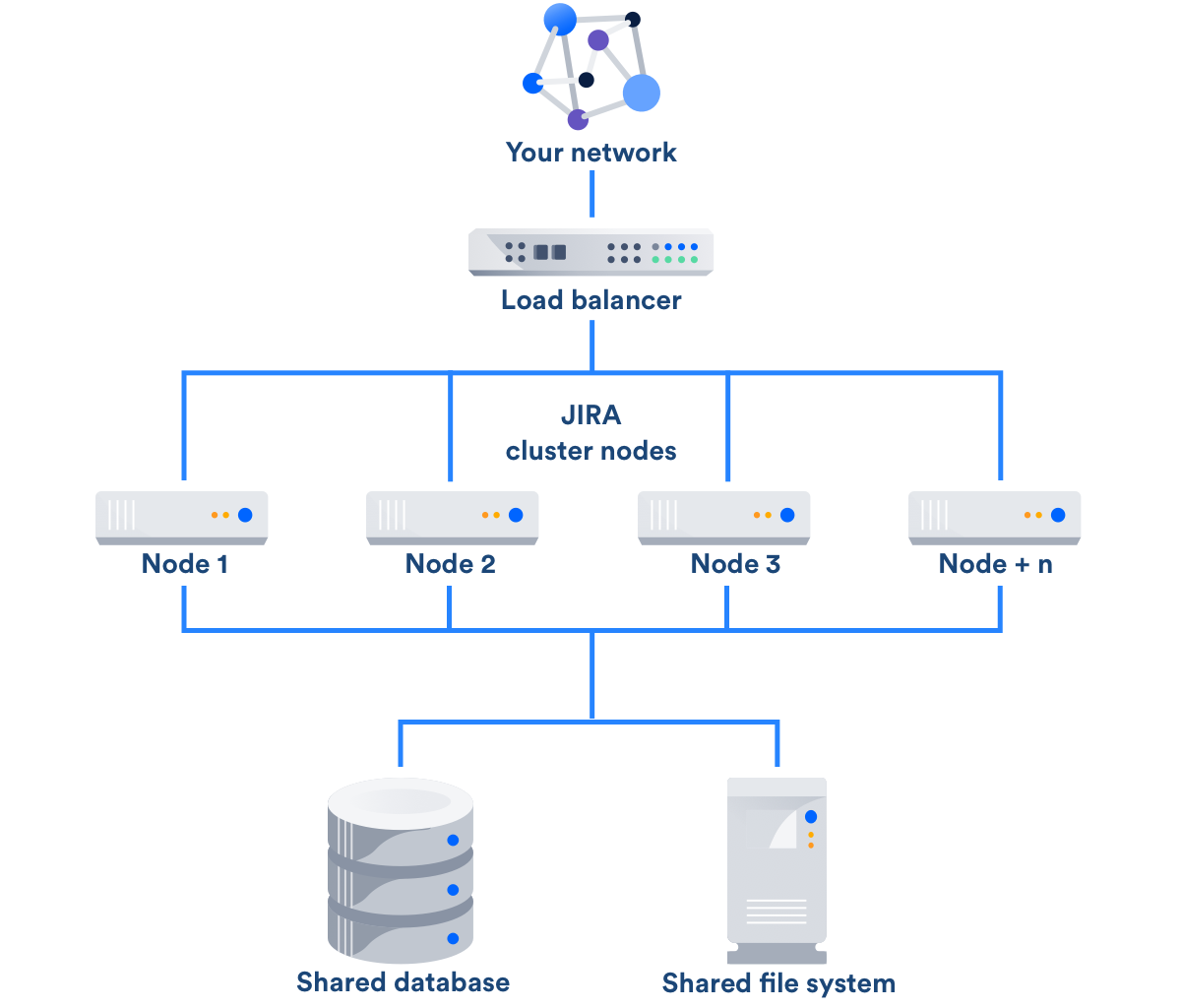
Data Center consists of a cluster of dedicated machines, connected like this:
Load balancer
The load balancer distributes requests from your users to the cluster nodes. If a cluster node goes down, the load balancer immediately detects the failure and automatically directs requests to the other nodes within seconds. You can use any load balancer that supports session affinity.
Application nodes
The cluster of Data Center nodes share the workload of incoming requests. Failure of a cluster node causes virtually no loss of availability for users, because requests are immediately directed to other nodes.
Shared database and storage
Data Center supports the same databases that are supported for Jira Software Server. It also supports any shared file system, which stores: import/export files, plugins, Logos directory, shared caches, and any data directory which includes attachments, avatars and icons.
Additional Data Center considerations
- You can continue to use application links with Data Center to link multiple Atlassian applications together. Data Center supports Applinks version 4.2.1 and later.
- You can use many plugins with Data Center. For information about the use of plugins with Data Center, see the Plugin guide to Jira high availability and clustering.
Atlassian Enterprise releases
An Atlassian Enterprise release is a feature release that gets backported security updates and critical bug fixes during its entire two-year support window. If you can only upgrade once a year, consider upgrading to an Enterprise release. Learn more
2018-12-12
[HAProxy] Haproxy termination vs passthrough
#A/ Termination
Client--(https)-->HAPROXY--(http)-->Backend
#Source: https://www.digitalocean.com/community/tutorials/how-to-implement-ssl-termination-with-haproxy-on-ubuntu-14-04
#B/ Passthrough
Client--(https)-->HAPROXY--(https)-->Backend
Client--(https)-->HAPROXY--(http)-->Backend
#Source: https://www.digitalocean.com/community/tutorials/how-to-implement-ssl-termination-with-haproxy-on-ubuntu-14-04
#B/ Passthrough
Client--(https)-->HAPROXY--(https)-->Backend
#Source: https://serverfault.com/questions/738045/haproxy-to-terminate-ssl-also-send-ssl-to-backend-server
frontend app1_ssl
    bind *:443 ssl crt /etc/haproxy/certs.d/example.com.crt crt /etc/haproxy/certs.d/ no-sslv3

    option http-server-close
    option forwardfor
    reqadd X-Forwarded-Proto:\ https
    reqadd X-Forwarded-Port:\ 443

    # set HTTP Strict Transport Security (HTST) header
    rspadd  Strict-Transport-Security:\ max-age=15768000

    # some ACLs and URL rewrites...

    default_backend             backend_app1_ssl


backend backend_app1_ssl
    server mybackendserver 127.0.01:4433 ssl verify none
2018-12-11
[Linux] delete all data except 4 file newest
#______________________DELETE_OLD_DATA:BEGIN
#Source: https://stackoverflow.com/questions/25785/delete-all-but-the-most-recent-x-files-in-bash
FOLDER_DST=/opt/bk
mkdir -p $FOLDER_DST
cd $FOLDER_DST
#Giu lai 4 file moi nhat trong thu muc [$FOLDER_DST]:
rm -rf `ls -t | awk 'NR>4'`
#______________________DELETE_OLD_DATA:END
#/opt/script/fwsync-HOST01_2_HOST02.sh
#LastUpdate: #09:38 2018.12.23
#################################################
#FILE_NAME=fwsync-HOST01_2_HOST02.sh
#HA_VHOST=/opt/script
#cat $HA_VHOST/$FILE_NAME | grep LastUpdate
#################################################
#SYNC FW:
#0 */1 * * * /opt/script/fwsync-HOST01_2_HOST02.sh
#################################################
#__________________________________CONTENT:BEGIN
HOST01=srv186_HaProxy01
HOST02=srv187_HaProxy02
#1/ BACKUP $HOST02 CONFIG:
ssh -p 65022 root@$HOST02 "\
mkdir -p /etc/iptables;\
cd /etc/iptables;\
rm -rf *.bk;\
cp -vR /etc/iptables/rules.v4 /etc/iptables/rules.v4-[$HOSTNAME]-[$(date +'%Y.%m.%d-%H.%M.%S.%3N')].bk;
"
#
#2/ SYNC 100% CONFIG FROM HOST01->HOST02:
rsync -avz -e "ssh -p 65022" /etc/iptables/rules.v4 root@$HOST02:/etc/iptables/rules.v4
#__________________________________CONTENT:END
#THE-END
##rm -rf `ls -t *.bk | awk 'NR>4'`;\
#Source: https://stackoverflow.com/questions/25785/delete-all-but-the-most-recent-x-files-in-bash
FOLDER_DST=/opt/bk
mkdir -p $FOLDER_DST
cd $FOLDER_DST
#Giu lai 4 file moi nhat trong thu muc [$FOLDER_DST]:
rm -rf `ls -t | awk 'NR>4'`
#______________________DELETE_OLD_DATA:END
#/opt/script/fwsync-HOST01_2_HOST02.sh
#LastUpdate: #09:38 2018.12.23
#################################################
#FILE_NAME=fwsync-HOST01_2_HOST02.sh
#HA_VHOST=/opt/script
#cat $HA_VHOST/$FILE_NAME | grep LastUpdate
#################################################
#SYNC FW:
#0 */1 * * * /opt/script/fwsync-HOST01_2_HOST02.sh
#################################################
#__________________________________CONTENT:BEGIN
HOST01=srv186_HaProxy01
HOST02=srv187_HaProxy02
#1/ BACKUP $HOST02 CONFIG:
ssh -p 65022 root@$HOST02 "\
mkdir -p /etc/iptables;\
cd /etc/iptables;\
rm -rf *.bk;\
cp -vR /etc/iptables/rules.v4 /etc/iptables/rules.v4-[$HOSTNAME]-[$(date +'%Y.%m.%d-%H.%M.%S.%3N')].bk;
"
#
#2/ SYNC 100% CONFIG FROM HOST01->HOST02:
rsync -avz -e "ssh -p 65022" /etc/iptables/rules.v4 root@$HOST02:/etc/iptables/rules.v4
#__________________________________CONTENT:END
#THE-END
##rm -rf `ls -t *.bk | awk 'NR>4'`;\
Subscribe to:
Posts (Atom)